I have had some challenges with the Push function on my phone from the beginning I have owned it. As I was under the impression that jailbroken/unlocked iPhones could not have push activated I did not really look further into this problem. Recently I found out how to activate the push function on my iPhone:
I have tried different solutions and eventually I ended up with a paid fix from pushfix.info. Since many solutions give you a shared key the push might not work as should be. Pushfix creates a separate key for your phone which synchronizes with the servers of your network/apple. It costed me $5.99 but I have to admit it was the best money I have spent on any iPhone App. The creators give full online support that helped me in the beginning because I could not get it to work. Now, to activate push on your jailbroken iPhone do the following:
1. Go to www.pushfix.info and pay the $5.99
2. Go to Cydia and add the source http://cydia.pushfix.info/ in Cydia
3. Download and install pushfix
4. Test the connection with the free app Push Test that comes with the package.
5. Now your push notifications should work.
Help!! It doesn't work?!?
Check out the instructions on http://pushfix.info/forum/viewtopic.php?f=5&t=39 or open a support ticket: http://pushfix.info/ticket/
Showing posts with label Jailbreak. Show all posts
Showing posts with label Jailbreak. Show all posts
Friday, February 5, 2010


Wednesday, July 29, 2009
How to install custom IPA files on iPhone
This post will teach you how to install custom IPA files on your phone. Why is this good news? Custom IPA files are cracked apps that will save you money since you will not have to buy this apps. Be advised that you may be interfering with copyrights. If you do not know what you are doing, please stop reading this post.
src="http://pagead2.googlesyndication.com/pagead/show_ads.js">
How to prepare your phone:
1. Make sure that your iPhone is Jailbroken. For more info about this read my other post (click here for Dutch version)
2. Make sure to use iTunes 8.2 or higher
3. Make a backup of your iPhone (in the event that anything goes wrong, you will still have your files, contacts etc.)
4. THIS INSTALLATION IS ON OWN RISK. you might have to do a DFU restore, more info on iclarified
5.This patch has to be installed through Cydia, Icy can not be used.
6. The patch only works in iPhone OS 3.0
7. DO NOT CONTINUE IF YOU DO NOT KNOW WHAT YOU ARE DOING
Step 1
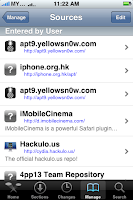
Add the source http://cydia.hackulo.us/ in Cydia. In Cydia click on Manage --> Sources --> Edit --> Add.
Step 2
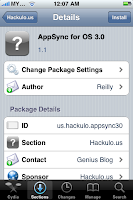
Restart Cydia and press Search, type AppSync. You will find the patch Appsync. Select the program and press install-->confirm.
Step 3
Restart your iPhone (the patch will not work if you don't do this)
Step 4
Download your favorite IPA files (Apps) and install by double clicking on the icon. The App will be loaded in to iTunes after which you are able to synchronize with your iPhone.
Good luck!
src="http://pagead2.googlesyndication.com/pagead/show_ads.js">
src="http://pagead2.googlesyndication.com/pagead/show_ads.js">
How to prepare your phone:
1. Make sure that your iPhone is Jailbroken. For more info about this read my other post (click here for Dutch version)
2. Make sure to use iTunes 8.2 or higher
3. Make a backup of your iPhone (in the event that anything goes wrong, you will still have your files, contacts etc.)
4. THIS INSTALLATION IS ON OWN RISK. you might have to do a DFU restore, more info on iclarified
5.This patch has to be installed through Cydia, Icy can not be used.
6. The patch only works in iPhone OS 3.0
7. DO NOT CONTINUE IF YOU DO NOT KNOW WHAT YOU ARE DOING
Step 1
Add the source http://cydia.hackulo.us/ in Cydia. In Cydia click on Manage --> Sources --> Edit --> Add.

Step 2
Restart Cydia and press Search, type AppSync. You will find the patch Appsync. Select the program and press install-->confirm.

Step 3
Restart your iPhone (the patch will not work if you don't do this)
Step 4
Download your favorite IPA files (Apps) and install by double clicking on the icon. The App will be loaded in to iTunes after which you are able to synchronize with your iPhone.
Good luck!
src="http://pagead2.googlesyndication.com/pagead/show_ads.js">
Subscribe to:
Posts (Atom)